How to Open an Amazon Seller Account from Bangladesh in 2026: A Step-by-Step SKZ Group Guide | SKZGROUP
published June 18, 2026Author: Anique Chowdhury
How to Open an Amazon Seller Account from Bangladesh in 2026: A Step-by-Step SKZ Group Guide
Learn how to open an Amazon Seller Account from Bangladesh in 2026 with this step-by-step guide covering requirements, setup, verification, and selling tips.
If you’re wondering how to open an Amazon Seller Account from Bangladesh, you’re not the only one.
Global eCommerce crossed $6.4 trillion as of 2025, and Bangladeshi entrepreneurs are racing to claim their fair share in the market. And when it comes to thriving in eCommerce, Amazon undoubtedly leads the fleet of eCommerce platforms.
Reports say Amazon alone hosts over 9.7 million active sellers worldwide, yet most Bangladeshi business owners still believe the platform is out of reach. Well, that’s not the case.
It starts with having a Seller Central account on Amazon. Opening an Amazon seller account from Bangladesh is entirely possible in 2026. With the right documents, a viable payment gateway, and a clear registration process, you can reach 300+ million Amazon customers across the US, UK, Europe, and beyond — all without leaving Dhaka.
This guide will walk you through every step: required documents, the registration process, post-approval setup, and how to avoid the most common rejection pitfalls.
Whether you're a seasoned exporter or a first-time eCommerce entrepreneur, this is your complete Amazon Seller Central registration guide.
CTA: Ready to skip the guesswork? SKZ Group offers end-to-end Amazon seller account setup and consultation for Bangladeshi entrepreneurs. Get in touch to get started.
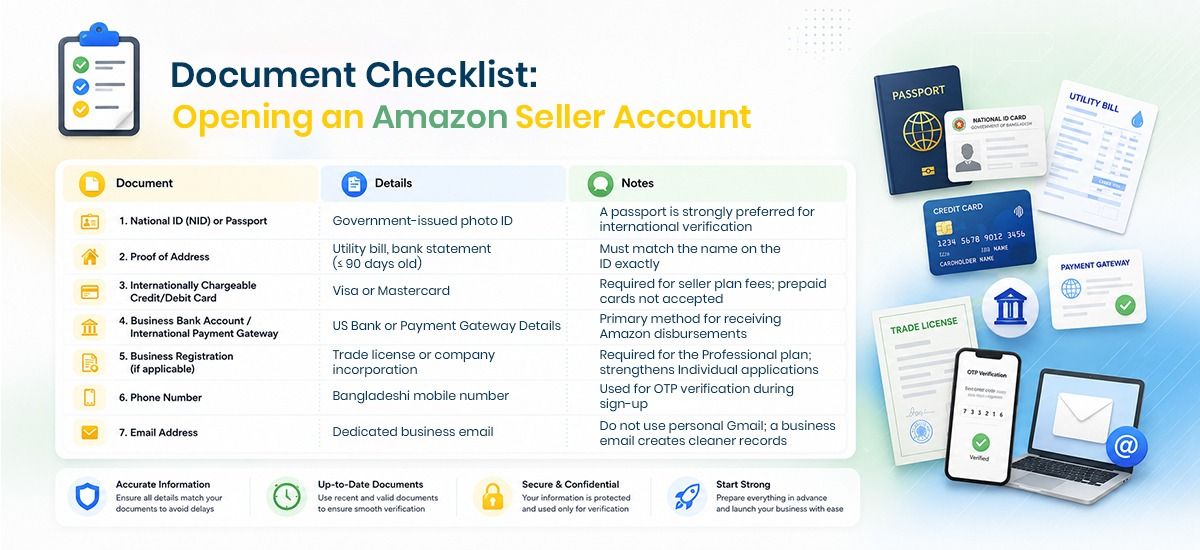
Prerequisites: Required Documents & Setup for Amazon Seller Account Bangladesh
Before you visit Seller Central, gather everything in advance. Incomplete or mismatched documents mostly stand out as the cause of rejection for Bangladeshi applicants.
Impact & Future Plans
With this launch, SKZ Group aims at:
Reaching out to global regions with digital retail expertise
Bringing the latest products at customers’ forefront
Enhancing customer experience with automation
Fostering a digital e-commerce ecosystem with higher employment rates
SKZ Group believes that this new brand will prove to be a key player in future expansion.
SKZ Group serves with diverse knowledge within a broad eco-system, businesses, and individuals worldwide, both in technologies and international trade.
Document checklist
Individual vs. Professional Plan: Which Is Right for You?
Feature
Individual Plan
Professional Plan
Monthly Fee
$0 (no subscription fee)
$39.99/month
Per-Item Fee
$0.99 per sale
No per item fee
Best For
Testing the waters (41 items/month)
Serious sellers with volume
Access to Advertising
❌Blocked
✅Unlocked
Bulk Listing Tools
❌ No
✅ Yes
Amazon Brand Registry Eligible
✅ Depending on your intellectual property
✅ Depending on your intellectual property
Recommendation for Bangladeshi sellers:
Start with Individual if you're testing a product.
Upgrade to Professional once you hit consistent sales.
Your plan starts flying once you sell more than 40 units per month.
Setting Up Your Bank Account for Amazon Seller Payments
Amazon does not support direct transfers to Bangladeshi bank accounts.
The only way to receive payments is to have a global financial service account linked with your Amazon Seller account. A few popular payment gateways that most Bangladeshi Amazon sellers use for global transactions are Wise, Stripe, Payoneer, etc.
Amazon will treat these payment gateways as local bank accounts where they can transfer funds. Once you receive your payment in your official account, you can then transfer funds to your Bangladeshi bank account in local currency (BDT).
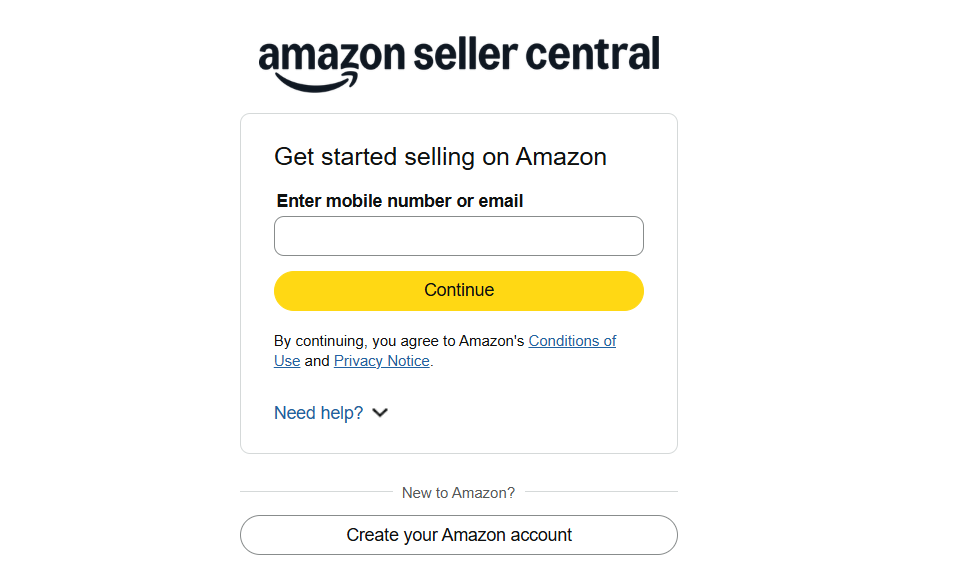
Choose whether to use an existing Amazon customer account or create a new one.
A new dedicated account is highly recommended for a business account.
Select your marketplace: Most Bangladeshi sellers target Amazon.com (USA) for maximum global reach. However, Amazon.co.uk and Amazon.de can also link you with a significant number of customers.
Note for BD Sellers: Use a VPN only if you experience region-based blocks. Amazon's terms permit international sellers. No need to mask your location.
Step 2: Enter Business & Seller Information
Amazon will ask for:
Business type: Select "None / I am an individual" if you're unregistered, or "Privately owned business" if you have a trade license.
Business name: This becomes the name of your Amazon retail store.
Country of establishment: Select Bangladesh.
Seller name/display name: Choose something professional and brand-aligned.
Note for BD Sellers: Proceed as an individual if a company registration isn’t available. However, having a trade license significantly cuts the chance of a future account suspension.
Step 3: Billing & Bank Information Setup
This step is tricky, and this is where many Bangladeshi sellers get stuck. Follow these sub-steps carefully:
Credit/Debit card: Enter your internationally chargeable Visa or Mastercard to make Amazon's seller fees payment. It’s not where your sales revenue goes.
Deposit method (your payment account): Click "Use a bank account in another country" and enter your business bank account or payment gateway details (routing number and account number).
Details verification: Remember, even a single digit mismatch causes disbursement failures.
Step 4: Store Details & Identity Verification
Fill in your store details:
Store name
Product categories you plan to sell
Whether you have UPC/EAN codes, and
Whether you manufacture the products yourself
Then complete identity verification (Amazon seller verification process):
Upload your passport or NID (both sides, if NID).
Upload your proof of address document [Utility bill, bank statement (≤ 90 days old)]
Complete a live video call with an Amazon associate or submit documents for automated verification.
Troubleshooting: Common Issues for Bangladeshi Applicants
Issue
Likely Cause
Solution
OTP not received
Network delay or blocked number
Move to a better network location or retry after 10 minutes
Document mismatch error
Name on ID ≠ name on bank account
Ensure all names match exactly, including spelling
"Unable to verify" on the address proof
Document too old or address unclear
Use a bank statement dated within 90 days
Account stuck in review
Manual review triggered
Wait 5–7 business days; check registered email
Billing charge rejected
Card not enabled for international transactions
Call your bank to enable international online payments
Facing issues with documents or verification?
SKZ Group offers expert document review and guided account setup for smooth Amazon Seller Central Bangladesh registration.
Post-Approval Stage: Launching Your Amazon FBA Bangladesh Business
Congratulations!
Your account is approved. Now the real work begins.
Post-Approval Activities: Product Listing to Account Health Monitoring
1. Create your first product listing:
Use Amazon's "Add a Product" tool.
Create a new listing from scratch for new products without an existing ASIN.
Conduct keyword research to create keyword-rich titles, bullet points, and backend search terms.
2. Set up FBA (Fulfillment by Amazon):
With FBA, you ship your inventory to Amazon's warehouses, and Amazon handles storage, packing, and delivery. For Amazon FBA Bangladesh sellers, this means:
Sourcing products locally or from China, India, or any feasible country.
Shipping to an Amazon fulfillment center in the US, UK, or EU
Amazon manages all customer-facing logistics from there
3. Enroll in Amazon Brand Registry (if you have a registered trademark):
It's crucial because Brand Registry unlocks A+ Content, Sponsored Brand ads, and stronger intellectual property protections.
4. Monitor your Account Health dashboard:
Keep your Order Defect Rate below 1%,
Late Shipment Rate below 4%, and
Pre-Fulfillment Cancel Rate below 2.5%.
Remember, not conforming to these thresholds risks account suspension.
4 Pro Tips to Help Bangladeshi Sellers with Common Challenges
The Seller account approval isn’t all. Running an Amazon business from Bangladesh comes with a few common hiccups. Here's what to prepare for:
Address verification delays are common because Bangladesh isn't a pre-approved marketplace country. Build in extra time — up to 2 weeks — for Amazon's manual review during initial setup.
Payment delays: Payoneer typically disburses within 3–5 business days after Amazon releases funds. Amazon holds new seller disbursements for the first 14 days, so expect a cash flow gap at launch.
International shipping complexity: Sending inventory from Bangladesh to Amazon fulfillment centers requires working with freight forwarders experienced in FBA prep requirements (labeling, packaging, carton standards). Skipping this step is a leading cause of Amazon account rejection for Bangladeshi sellers post-approval.
4 Pro tips from experienced Bangladeshi sellers:
Register a trademark before launching — it unlocks Brand Registry and better ad tools.
Open a dedicated business bank account in Bangladesh for clean BDT records.
Use Jungle Scout or Helium 10 for product research before committing to inventory.
SKZ Group can manage yourentire account setup, listing optimization, and ongoing FBA operations — so you focus on sourcing and growth.
Key Takeaways
Opening an Amazon seller account from Bangladesh in 2026 is straightforward when you have the right roadmap.
Documents first: Passport, proof of address, Payoneer account, and an international card — get these ready before you begin.
Payoneer is essential: It's the only practical way to receive Amazon payments in Bangladesh.
Name consistency matters: Mismatches across documents are the top cause of rejection.
FBA unlocks global reach: Ship inventory to Amazon's warehouses and let them handle the rest.
Account health is ongoing: Monitor your metrics from day one to avoid suspension.
Ready to launch?Contact SKZ Group → for expert account setup, listing optimization, and FBA support.